How a Training Question Became a Feature in Under a Week

A question asked in passing
Last Thursday we were in a room with the RAM Partners team for an in-person training.
That is where our best ideas come from. Somewhere in the middle of walking through the Make Ready Board, someone looked at the map and asked a question almost as an afterthought:
"Can we see our vacant units on the map, color coded by how long they've been vacant?"
It was not a formal feature request. It was the kind of thing people say in training all the time, usually followed by "but I'm sure that's a big ask."
It was a great question. Anyone who has managed a property knows the feeling of staring at a vacancy report, seeing a unit at 47 days, and having no idea what's special about unit 101-02. The answer may very well be tied to where the unit is. A building with a bad elevator. A floor with a loud neighbor. A corner of the property the turn team gets to last, or just a difficult unit turn. A list of unit numbers hides all of that. A map shows it.
In the middle of walking through the Make Ready Board, someone looked at the map and asked a question almost as an afterthought: "Can we see our vacant units on the map, color coded by how long they've been vacant?"
How PropTech companies prioritize their roadmap
I spent years on the other side of this table, running operations for a nationwide property management company. I know what happens to a question like that at most proptech companies, because I asked plenty of them.
If you are lucky, the rep says "great idea, I'll pass that along." If you are really lucky, someone sends you a link to a feature request portal where you can submit it and upvote it. Then it sits there. Six months later you get an email that says it has been added to the roadmap. A year later you have stopped checking.
Not because those companies are bad. It is because the process is built to protect the roadmap from the customer and to prioritize building based on revenue generation. Requests get triaged, scored, prioritized against a quarterly plan while weighing the economic benefits of the feature. By the time anything ships (if it does) the user found a work around.
The net effect is that clients stop asking for things.
How AppWork prioritizes our roadmap
Sam Gibbs, one of our Client Success Directors brought the request to the engineering team. The request landed with Eusebiu Chiriac, an incredible engineer. Here is the problem. Eusebiu was already heads down on a much larger project for another client. He did not want that project to slip by a single day. He also did not want RAM to wait.
So he did the obvious thing, he built it in the middle of the night, on his own time, as a side project nobody knew about! He kept his day project on schedule and delivered a working heat map.
From a question in passing on a Thursday to a feature in production the following week. Under seven days!
This is the AppWork difference. The remarkable people and talent on our team hears a client ask for something and feel the same itch I feel: this should exist, and it should exist now. They then work tirelessly to get it done ASAP.
You do not read the map. You just see it.
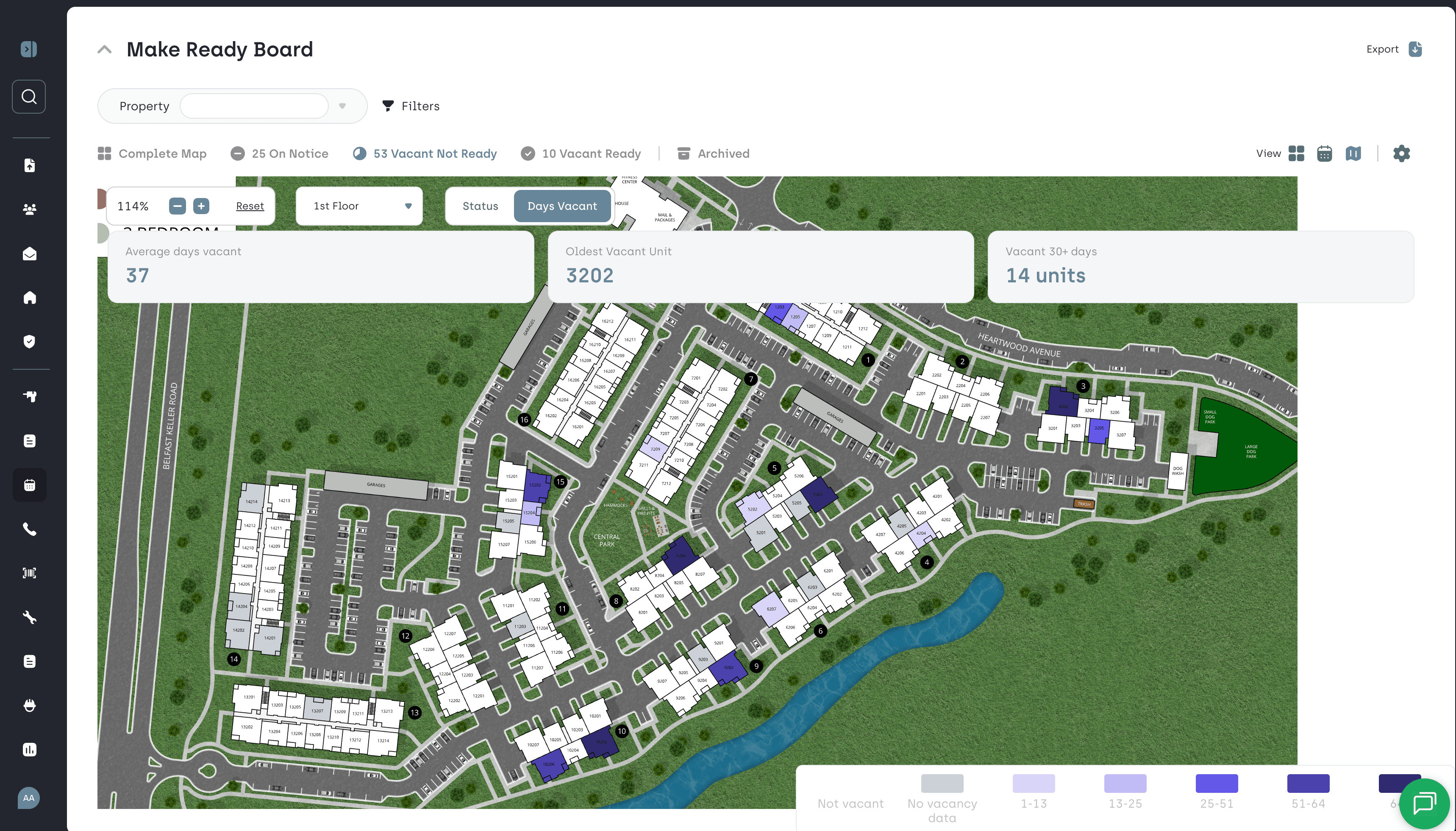
The Days Vacant heat map
The Days Vacant heat map lives inside the Make Ready Board map you already use, built on the Engrain map of your property. One toggle switches you between the status view you know today and the new Days Vacant view.
In the Days Vacant view, every vacant unit is shaded by how long it has been empty. The longer it sits, the darker it gets. A unit that turned over three days ago is barely tinted. A unit that has been sitting for 45 days is impossible to miss. You do not read the map. You just see it.
On top of the map, three numbers tell the story of your vacancies at a glance:
- Average days vacant across the units that are currently vacant
- The single unit that has been vacant the longest
- The number of units that have been vacant for 30 days or more
Hover over any unit and you get the detail you would otherwise have to go hunting for: days vacant, Make Ready progress, and the scheduled move-in date. In two seconds you know whether that dark unit is about to turn or quietly stuck.
There is nothing to set up. If you have the Make Ready Board map today, the toggle is already there.
The Advantage of a Map vs a Report
Every day a unit sits vacant is rent you never get back. On a $2,800 unit, that is about $93 a day. Ten units sitting an extra two weeks each is over $13,000 gone, and nobody did anything wrong. It just took too long to notice.
The vacancy report has always been able to tell you the number. What it cannot tell you is the pattern. Days vacant is a symptom. The cause is almost always physical, and physical things live on a map.
When the dark units cluster in one building, you have a building problem. Maybe it is the one with the leak or the longest walk from parking. When they cluster on the top floor, the issue might be the elevator or the heat. When they are scattered on the far side of the property, it may be that the turn crew works front to back and those units always get touched last. Each of those is a different conversation with a different fix. These are things you don't see in an old fashion list.
That is what the heat map gives your team: location awareness. Regional managers can open one property and see the shape of the problem in seconds. Maintenance leaders can point at a floor and ask why. Asset managers can look across a portfolio and spot the properties where the dark spots are spreading.
And because it sits inside the Make Ready Board, the fix is one click away. Hover, see the unit is 38 days vacant with Make Ready at 60 percent and no move-in scheduled, and you know exactly who to call.
Turn faster. Lease faster. Catch the slow units before they become the expensive ones.
Days vacant is a symptom. The cause is almost always physical, and physical things live on a map.
The AppWork Way
People sometimes ask why we still do client training in person. It is expensive. It doesn't scale. A recorded course is easier and cheaper.
This story is the answer. The Days Vacant heat map did not come from a survey or a feature portal. It came from a person in a room, looking at a real map of their real property, saying out loud what they wished it could do. You do not get that from a webinar. You'd be lucky if they were paying attention yet interrupting a webinar for a question.
Inside AppWork we talk about three things: Personalize, Obsess, and Wow. Most of that is hard to explain in the abstract, so here is what it looked like last week.
Personalization is being in the room with RAM instead of behind a screen.
Obsess is Sam refusing to let a good idea die, and Eusebiu losing sleep because a client should not have to wait.
Wow is the client seeing their own suggestion live on the map before the next training is even scheduled.
We are a maintenance company first. We are not trying to be everything to everyone. That focus is what lets us move like this. When every person on the team understands the problem a property manager is trying to solve, nobody needs a committee to recognize a good idea. They just build it.
There are plenty of things we do not do as well as the big players. Shipping a client's idea in under a week is not one of them.
We are listening
Thank you to RAM Partners for the question, to Sam for carrying it, and to Eusebiu for turning it into something real while the rest of us were asleep.
If you are an AppWork client and you have ever said "it would be great if AppWork could..." and then stopped yourself, please stop stopping yourself. Say it in the training. Say it to your Client Success Manager. Put it in a Work Order comment if you have to. We are listening, and we are built to act on it. This is not the first time a client said something in a room that changed what we do. Read about the client who asked to pay us more.
And if you are not an AppWork client yet and you are tired of feature request portals, come sit in on a training. Bring your questions. You might see one of them on the map by the following week.

Sean has dedicated 10 years to the multifamily industry, most recently serving as SVP of Operations. With a real-world understanding of property managers' needs, he guides the development of AppWork. He is responsible for overseeing the day-to-day running of the company.