AppWork June Release Adds Live Call Tracking


AppWork's latest release brings live call tracking, smarter inspection templates, new open API endpoints, and a more informative Make Ready Board to our multifamily maintenance platform.
Property managers get real-time visibility into inbound and outbound maintenance calls as they happen, maintenance teams get inspection templates that generate more accurate post-inspection work orders, and developers get new API endpoints for inspections and bulk unit creation. Here's everything new in AppWork this release, and why it makes managing work orders, inspections, and unit turns faster.
CALL MANAGEMENT
Live call tracking is here. You can now see calls in progress, live, right on the Call Management tab. No more waiting for the call log to tell you what already happened. Watch it as it happens.

The responder column remembered its one job. Fixed an issue where the responder wasn't showing up in the call log's responder column. A responder column with no responders is just a column. Sorted.
Voicemails stopped pretending to be messages. Calls that went to voicemail were showing as "message" instead of "missed." They're now logged as what they actually are.
INSPECTIONS
N/A is no longer always an option. Not applicable is not always applicable. You can now set specific items on an inspection template where N/A can't be selected, so every item gets a real answer.
Set it up: Settings > System Settings > Maintenance > Inspections > select template
Flag any custom input as Action Required. Set any custom inspection input as action required right in the template. AppWork uses it to generate post-inspection Work Orders more accurately, display inspection results more clearly, and seriously level up your inspection reporting.
WORK ORDERS
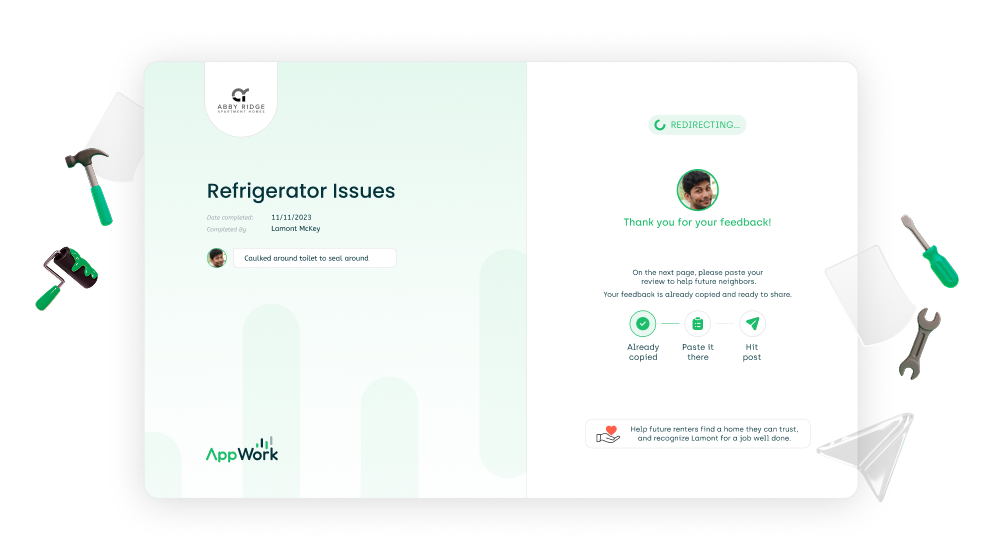
We redesigned the page residents land on after submitting a positive review. It's more intuitive, more informative, and built to turn happy residents into more online reviews.
Filter by property Work Orders. The unit filter now lets you pull up property-level Work Orders, so you can see what's on the building without digging through units.
"Pets" is now "Animals." On the resident Work Order creation page. Service animals aren't pets, and now the form knows it too.
Lock the permission to enter toggle. You can now remove residents' ability to change the permission to enter toggle when they submit a Work Order. You set the policy. The form follows it.
REPORTING
Response time report, now filterable by unit. A whole new way to understand the resident experience: how long it actually takes to resolve Work Orders, unit by unit.
MAKE READY BOARD
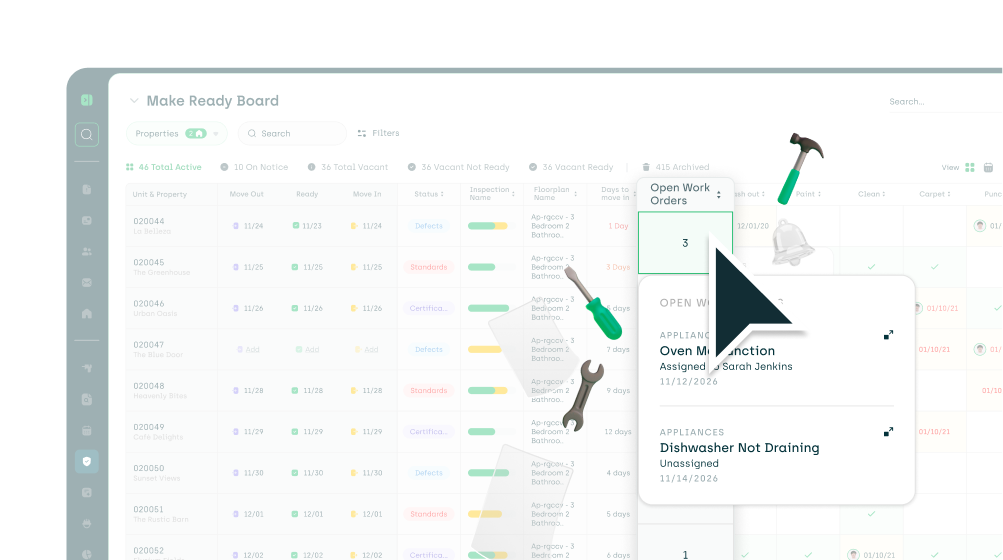
Open Work Orders, right on the board. New column type: Open work orders! When a unit hits the Make Ready Board, you'll see exactly how many open Work Orders it has, and you can drill straight into them from the board. Fewer surprises mid-turn. Cleaner unit turns.
API Updates
We keep widening the open Application Programming Interface (API) so more multifamily clients and partners can plug straight into AppWork. The more connected your stack, the less double entry you do.
Inspections joined the API. Two new endpoints: pull your full inspection list or grab the details on a specific inspection. Your data, wherever you need it.
Create units in bulk with the new POST endpoint. New units, new buildings, whole new acquisitions: push multiple units into AppWork in one call instead of clicking them in one at a time.
This release makes AppWork an even stronger maintenance operations platform for multifamily property management: live call visibility, configurable inspection templates, response time reporting by unit, open work orders on the Make Ready Board, and an expanding open API for property management integrations. Questions about this release? Reach out to your customer success manager or check the AppWork knowledge base.