Multifamily Maintenance Software Built for Your Team
What's New in AppWork: Smarter Work Orders, Cleaner Call Logs, and Incident Reports You Can Actually Customize
June 1, 2026
Every maintenance operation has a version of the same problem: small inefficiencies that don't make the headline list, but quietly drain time, cause confusion, and add up to a lot of wasted effort. A duplicate Work Order that sends two techs to the same unit. A missed call that nobody noticed. An incident report with fields that don't match how your property actually operates.
This release targets exactly those problems. It's not a single splashy feature — it's a focused set of improvements across Work Orders, Call Management, Lease Audits, and Incident Reports that remove friction from the workflows your team runs every single day.
Here's everything that's new, and why it matters for your operation.
Work Orders: An Industry First, Just in Time for Summer
AppWork Now Detects Duplicate Work Orders Automatically
Summer is coming. AC units are about to start failing. Residents are going to flood your inbox. And your team's Work Order list is about to get very long, very fast.
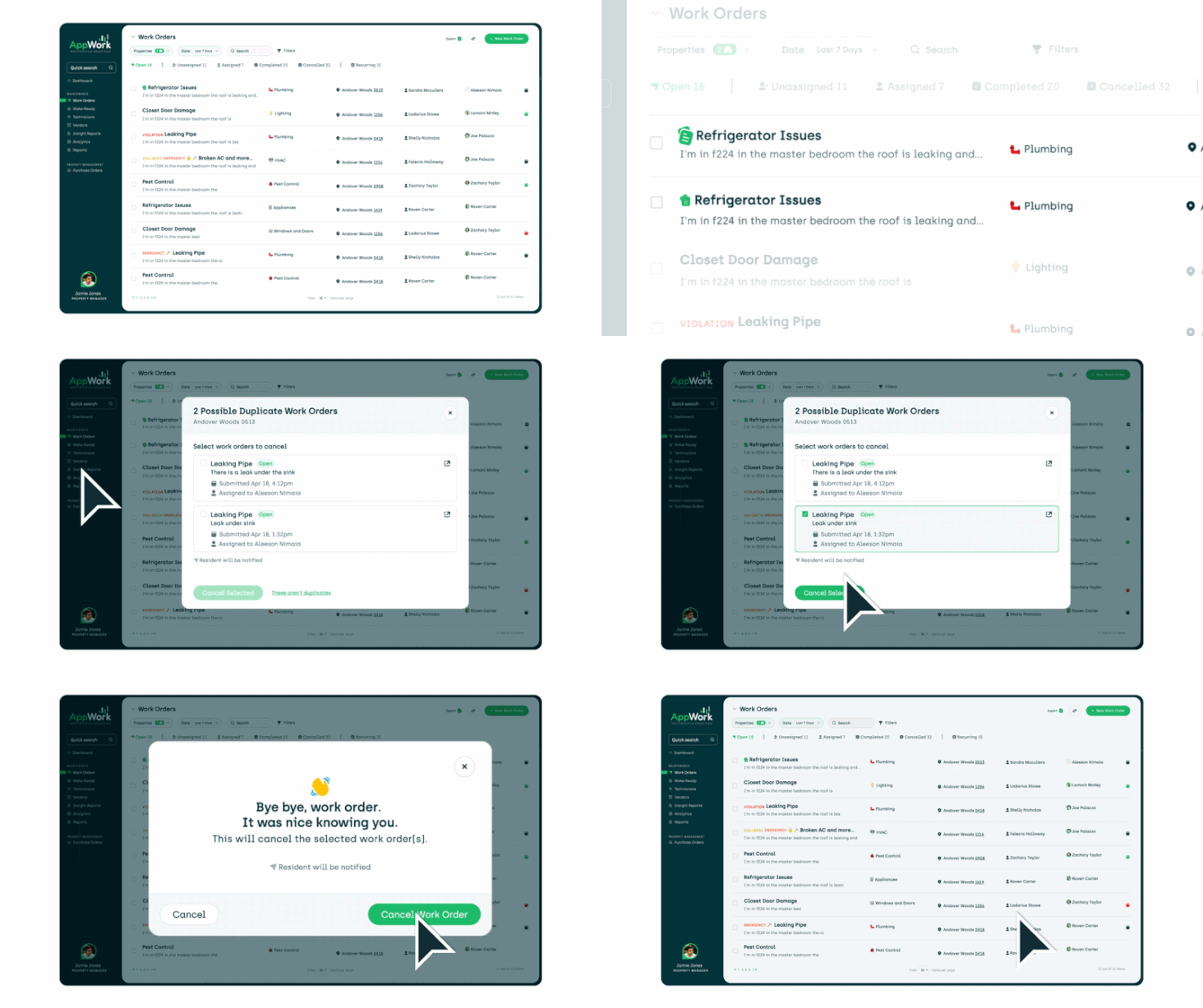
Here's what makes this season especially chaotic: duplicate Work Orders. One resident submits a request through the portal. Another calls the front office about the same broken unit. A tech gets dispatched twice. A work order sits open after the job is already done. Your list grows, your team scrambles, and nobody has a clear picture of what actually needs attention.
No property management software in the industry has ever automatically detected and flagged duplicate Work Orders. Until now.
No property management software in the industry has ever automatically detected and flagged duplicate Work Orders. Until now!
AppWork's new duplicate detection engine continuously scans your open Work Orders and flags potential duplicates before they create problems. Your team reviews the flagged items, cancels the extras, and gets back to a clean, accurate list of what's actually open. No manual cross-referencing. No guesswork. Just an honest picture of your workload at any given moment.
To make cleanup fast, a new one-click filter surfaces only the flagged duplicates. Your team spends seconds resolving them, not minutes hunting for them.
This matters every month. But it especially matters in June, July, and August, when Work Order volume spikes and every duplicate on the list is one more distraction pulling your team away from the real work. Research from McKinsey (via ProptechOS) found that effective work order management systems can reduce the maintenance cost of assets by up to 25%. Getting your list clean and accurate is the starting point for all of that.
Unread Resident Messages Are Now Instantly Visible
When a resident sends a message on an open Work Order, your team now sees a green dot next to the resident's name. At a glance, you know who's waiting on a response. No more opening Work Orders one by one to check for unread messages.
Attachments from Your PMS Now Sync Automatically
If a photo or attachment gets added to your Property Management System (PMS) after a Work Order has already been created in AppWork, the system now pulls it in automatically. Your techs always have the complete picture, even when supporting information arrives after the initial submission. Learn more about AppWork's PMS integrations.
Residents Get Notified the Moment a Vendor is Assigned
One of the most common resident complaints in maintenance is not knowing what's happening with their request. The stakes are real: according to the 2025 Voice of the Resident Report, 47% of negative renewal reviews cited unresolved or poorly communicated maintenance issues, and maintenance-related complaints increased by 6.3% in 2024. Slow service and broken promises are now the leading causes of non-renewals.
When you assign a Work Order to a vendor, AppWork now automatically sends the resident a text message letting them know. Fewer follow-up calls to your front office. Better resident experience with no added effort.
When you assign a Work Order to a vendor, AppWork now automatically sends the resident a text message letting them know. Fewer follow-up calls to your front office.
Permission to Enter Changes Now Leave a Full Record
When a resident's permission to enter status changes on a Work Order, AppWork now logs exactly what changed, when it changed, and who changed it. That record lives right on the Work Order timeline. For any situation that requires documentation or accountability, the information is always there.
Call Management: Inbound and Outbound Calls Finally Have Their Own View
A Cleaner, More Useful Call Log
The Call Management log now splits into two dedicated tabs: one for inbound calls coming through your Call Management queue, and one for outbound calls your technicians are making to residents. Each tab shows the information that's actually relevant to that call type.
Previously, inbound and outbound calls were mixed together in a single log. That made it harder to spot patterns, identify missed calls, and understand what your team was actually handling. Now, you get a clear view of each.
See Who's in a Call Queue Without Leaving the Log
Hovering over the Queue column in the call log now shows you everyone assigned to that queue in real time. If you're trying to understand coverage or troubleshoot a missed call, the answer is right there.
AI Summaries Replace Transcript Walls in Work Orders
When a call through Call Management generates a Work Order, the description field used to populate with a full verbatim transcript. That made Work Orders hard to read and harder to categorize.
Now, AppWork uses AI to generate a clean summary of the call instead. The Work Order gets a concise, accurate description that's easier to act on and routes to the right category more reliably.
Lease Audits: Better Visibility into What's Missing
Flag Units with Missing Leases
Not every property has a complete set of leases on file. Now you can formally flag units where the lease is missing, rather than leaving them in an ambiguous state. Each flagged unit gets a clear status indicator on the Lease Audit page, so gaps are visible at a glance.
A new summary box also keeps a running count of how many leases are missing across the property and what percentage of the total that represents. Before you start tracking down missing documents, you'll know exactly how large the gap is.
Add Notes at the Unit Level
Some lease situations require context that a status label can't capture. A unit occupied by the property manager. A lease that's missing specific pages. Now you can add notes directly at the unit level on the Lease Audit page, so that context lives alongside the audit data instead of in someone's inbox or a separate spreadsheet.
Incident Reports: The Flexibility You've Been Asking For
Build the Incident Report Form Your Operation Actually Needs
This is a significant update for any property that has ever worked around the limitations of a fixed incident report form. And the stakes of getting incident documentation right are higher than most operators realize. As Leonardo247 notes, with the cost of multifamily insurance rising, timely and accurate incident documentation is one of the strongest tools available for managing liability. Submitting a complete, detailed report promptly establishes your record of what happened — before memories fade, witness statements disappear, and legal exposure grows.
You can now fully customize your incident reports. Add new questions, hide default questions that don't apply to your properties, and mark any question as required or optional. Custom questions support two input types: dropdown menus for structured answers, and text fields for open-ended responses.
You can now fully customize your incident reports. Add new questions, hide default questions that don't apply to your properties, and mark any question as required or optional.
This means your incident reports can reflect how your operation actually works, not how someone else assumed it would. To get started: Settings > System Settings > Incident Reports.
This update also included a complete rebuild of the incident reporting backend infrastructure. That foundation is what makes the customization possible today, and it's what will power further improvements to incident reporting going forward.
Additional Updates
Inspections. A frustrating cursor behavior while editing inspection inputs has been fixed. The cursor was jumping to the end of the line whenever someone tried to edit mid-word. It now stays where you put it. Costs for conditional inspections are now visible directly on the inspection itself, and a recurring issue with inspections generating before their scheduled time has been resolved.
Weather Intelligence. The "Weather Report" feature has been renamed "Weather Intelligence" across the entire platform. Same feature, better name, consistent everywhere.
The Bottom Line
This release doesn't introduce one dramatic change. It introduces a lot of smaller ones that collectively make your operation run more smoothly. Duplicate Work Orders get caught before they create confusion. Calls are easier to review and act on. Incident reports finally match the way you actually work.
The teams that will feel this release most are the ones managing high volume, running lean, and depending on accurate data to make decisions. If that sounds like your operation, these updates were built with you in mind.
As always, questions or feedback can go to your AppWork Customer Success contact. We're here. Or if you're not yet an AppWork customer, book a demo to see what you're missing.