Top Maintenance Co.
Winners announced February 15 >

Reports

Make faster, data-driven maintenance choices with AppWork’s real-time dashboards; built by decision-makers to help your daily decision making.
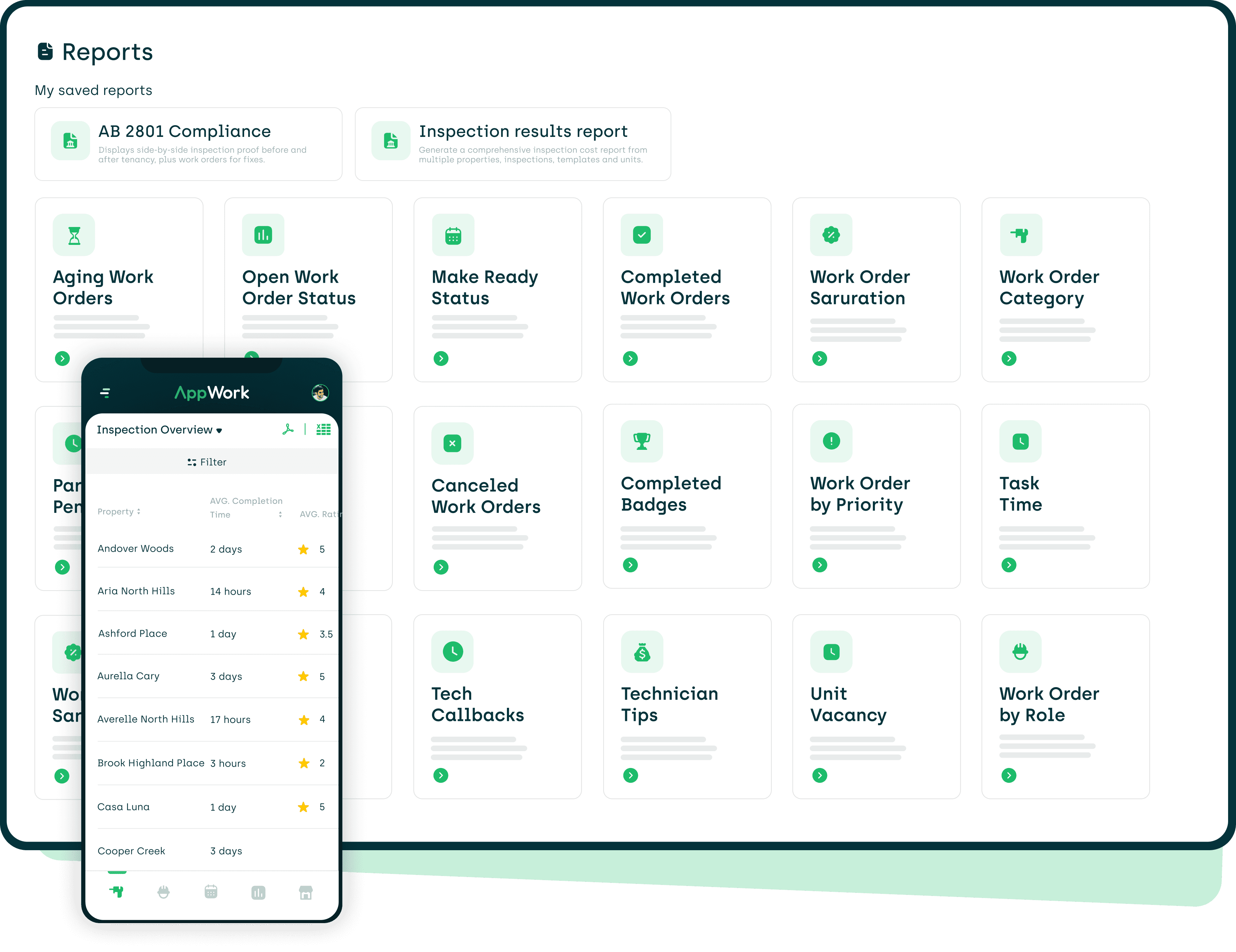
AppWorks reports module on a desktop and mobile device

Improved Maintenance

Compare different properties, statuses, categories and more to find areas that are not up to standard so you can improve in those areas.
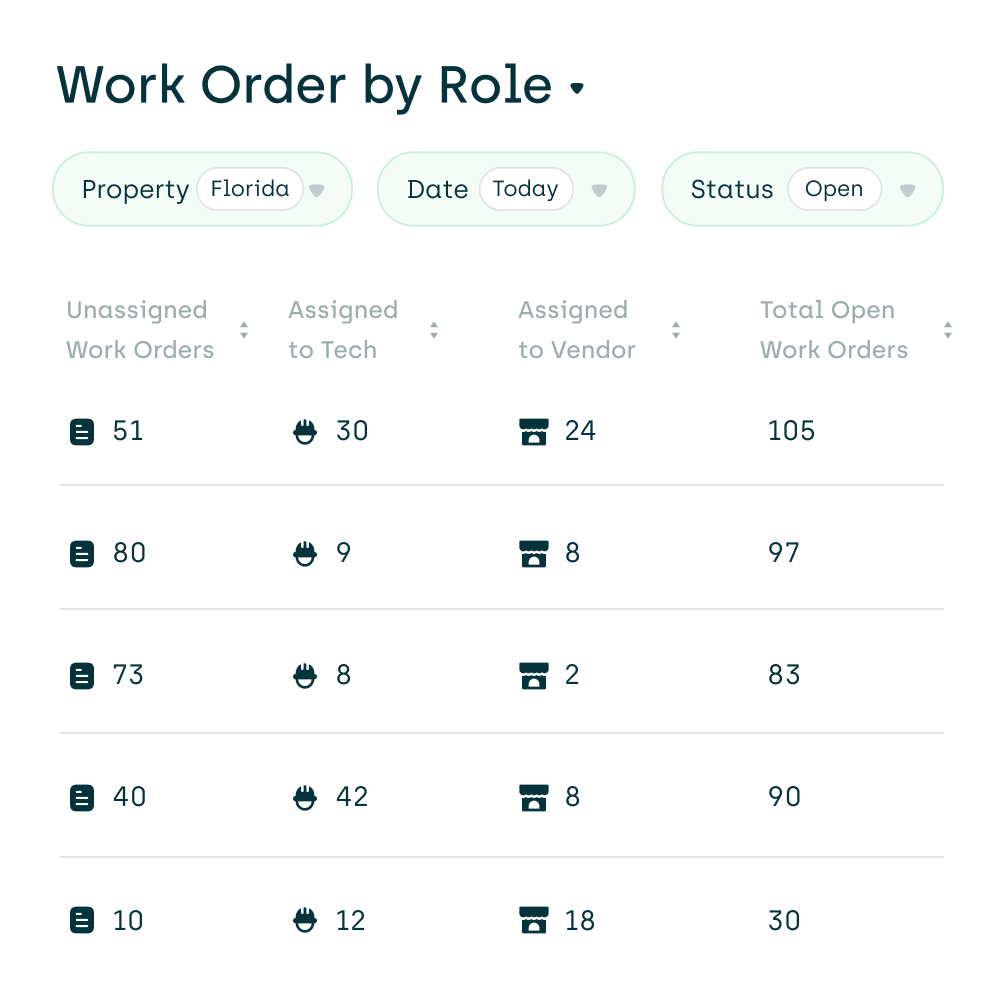
screenshot of our work order by role report
With our property filter, easily track data for one property, or compare data on a regional and portfolio level
Quick and informative view of overall property performance with recent stats to gain a broader understanding
Clear, easy-to-read data with detailed and summary reports
Share knowledge easily by exporting and downloading custom reports
AppWork's daily insight reports will help you see exactly what's happening (or not happening) 
for each of your properties.

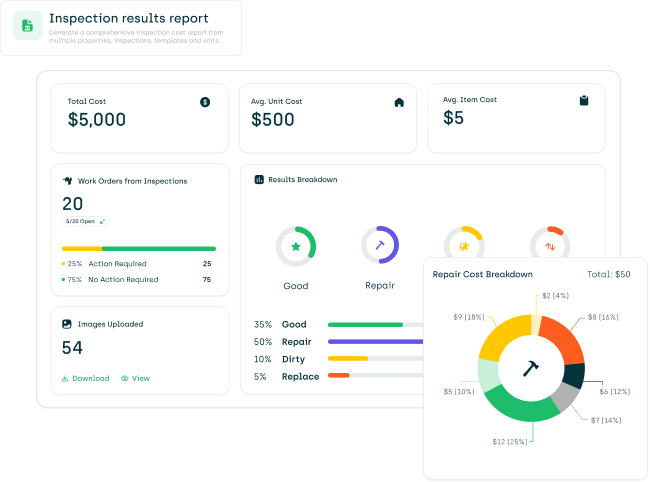
Inspection Results Report

A smarter way to review and manage your inspection data, while helping you cut costs and reduce errors.
Spot issues instantly, with clear breakdowns by inspection item and status type
Generate actionable reports with cost breakdowns across properties

Tag deficiencies and view detailed action breakdowns (Repair, Dirty, Replace) with costs
View and download everything in one place. 
Photos, costs, and progress for every inspection item
Aging Work Orders
Shows the age of open work orders: 30+ days, 8-29 days, 2-7 days, and less than one day.
Open Work Order Status
Shows the total number of open work orders and whether they are assigned vs unassigned.
Make Ready Status
Breakdown of vacant units by status: on notice, vacant, vacant ready, and vacant not ready.
Completed Work Orders
See completed work orders from a specified time.
Work Orders Saturation
Shows the current open work orders divided by the number of units in the property.
Work Orders Category
Breakdown of open and completed work orders by category.
Parts Pending
Details the open work orders awaiting parts and which parts are needed
Work Orders by Role
Shows the open and completed work orders and whether they are assigned to a tech vs vendor.
Canceled Work Orders
Details the person who canceled the work order, when, and why.
Work Orders by Priority
Shows the current open work orders divided into three statuses: regular, emergency, and violation.
Unit Vacancies
Details vacant units and shows the number of days empty plus progress on the turnover.
Tech Callbacks
Shows the percentage of work orders reopened, broken down by technician.
Technician Tips
Details the total amount of tips earned by each technician within a set period.

See Reports in Action for Free

Book a Demo

More Solutions

Product Features
AB 2801 
Compliance

Automate compliance with AB 2801 using specially designed features and comprehensive reports.

Insight Reports

Get a concise daily, weekly, and monthly snapshot of your operations and team performance.

Actionable Analytics

Turn data into directives with real-time and in-depth analytics.

Reports

View, generate, and export reports with a couple of taps from any device.

Technician App

A special app for your technicians to help increase operational efficiencies.

Vendor Management

Manage vendors like you manage your technicians, including resident reviews.

Purchase Orders

Request and approve purchase orders with ease. Includes detailed analytics and notifications.

Incident Reports

Create thorough documentation on the spot. Store reports digitally for easy access and searching.

Work Order Tracking

Easily create, track, search, and organize your work orders. Simple yet comprehensive.

Digital Make Ready Board

A collaborative, cloud-based make ready board to help decrease turnover times and reduce vacancy loss.

Inspections

Create and complete inspections with ease. It comes with an intuitive and easy-to-use interface.

Technician Management

Supercharge your maintenance team with in-depth analytics, performance badges, and reviews.

Refrigerant Logs

Track refrigerant usage across jobs and properties to spot inefficiencies and prevent losses

Asset Tracking

Centralize every asset in one simple dashboard with AppWork’s asset tracking

Call Management

When a resident has an emergency after hours, AppWork's IVR kicks in automatically