Boost Productivity with AppWork | Nov 23 2025 Release


Filter, Cancel, Improve: Your Most Efficient AppWork Release Yet
Get ready! This release is packed with new features and improvements to save your team time, reduce unnecessary work, and make your day-to-day smoother than ever. From brand-new work order filters that help you find exactly what you need in seconds to a new feature that lets residents cancel their own work orders, this update brings major quality-of-life improvements across Work Orders, Make Readies, Inspections, and more. Let’s take a look at what’s new!
Work Orders
1. Residents Can Now Cancel Their Own Work Orders!
Say hello to fewer unnecessary work orders and cleaner dashboards. Residents can now cancel their open work orders directly from any AppWork email update they receive.
Here’s how it works:
- Every resident WO email now includes a Cancel Work Order button.
- Clicking on the button will take the resident to a webpage where they can confirm their cancellation and provide a quick reason.
- Your team gets fewer duplicates, fewer no-access headaches, and more time back in the day!
This new workflow brings major efficiency while giving residents more ownership and flexibility, a win for everyone!

2. New Work Order Categories
Two new work order categories just landed:
- Pest Control › Wildlife
- HVAC › Fireplace
More categories are coming very soon, stay tuned! 👀
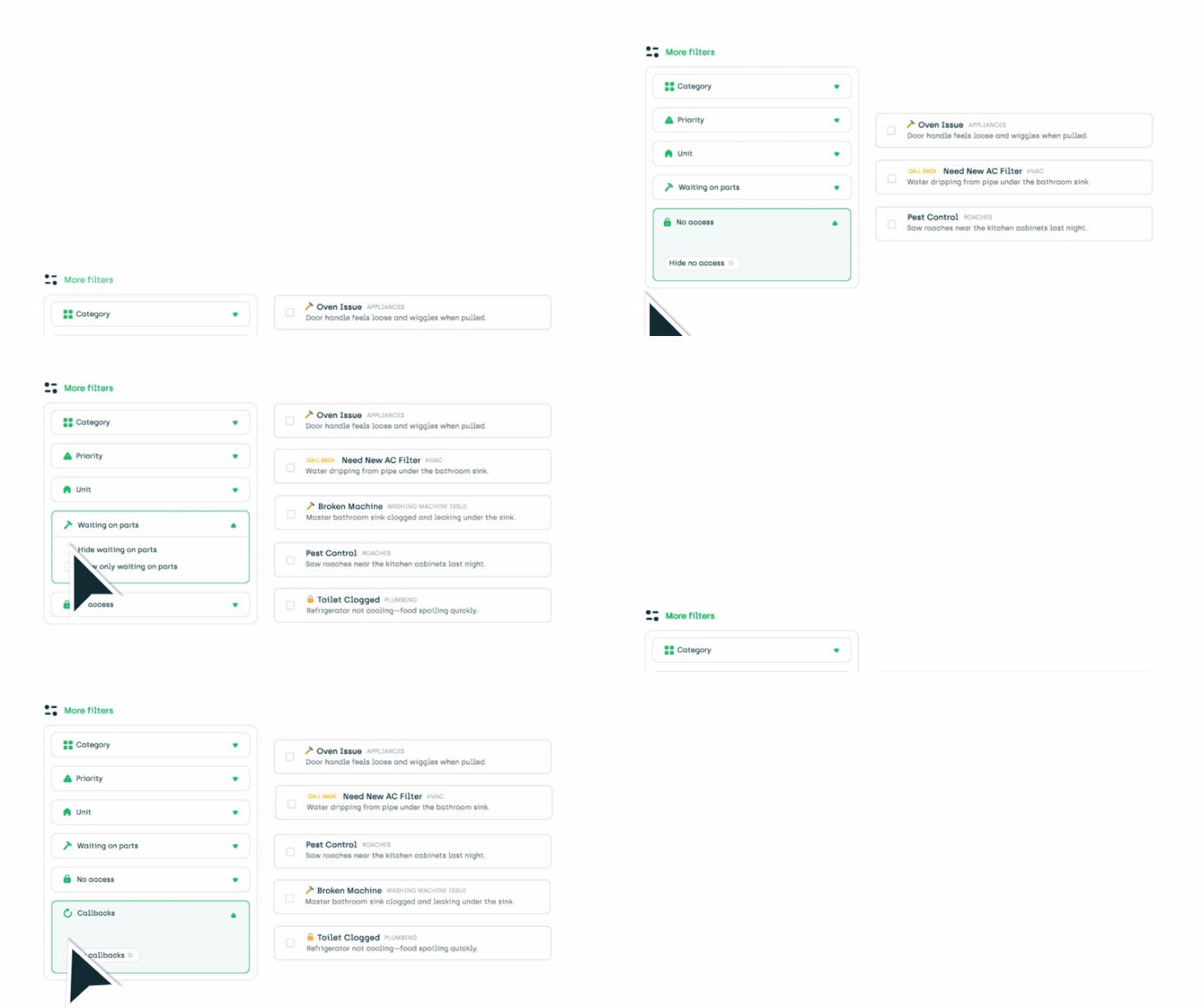
3. New Show/Hide Option for Work Order Filters
Finding exactly what you need just got way easier. We’ve completely upgraded our work order filters to give your team more control and clarity.
You can now select between Show or Hide for faster filtering on items like:
- Waiting on Parts
- Callback
- No Access
Make Readies
Faster loading calendar view
The Make Ready calendar now loads noticeably faster.
Clearer Property Group Views
When viewing a property group on the Make Ready board, you’ll now see the property name for each unit, making cross-property workflows easier to navigate.
Inspections
Recurring Inspections Now Respect the Correct Date
We resolved an issue where recurring inspections were firing on the wrong day. They now repeat exactly when they’re supposed to.
Technicians
- The Technician Index page now includes a Show More button so you can view your full technician list more easily.
- Resolved an issue where only 15 technicians were appearing.
- Fixed a bug where the Property Filter wasn’t working on the technician page.
General Improvements
- Fixed an issue where the new navigation bar was blocking the back button on mobile.
- Multiple performance improvements across the platform for more reliable, responsive daily use.
- The collapsable header has been improved for a smoother, cleaner experience.
- Fixed an error on the Tasks Time Report where clicking the total row caused a "Loading Tach Tasks Failed" message.
This release makes AppWork faster, more intuitive, and more resident-friendly than ever. From powerful new Work Order filters to resident-driven cancellations, we’re committed to helping your teams operate with clarity, speed, and confidence.
Have feedback? We’d love to hear it. Until then happy maintaining!